
<!DOCTYPE html>
<html lang=”en”>
<head>
<meta charset=”UTF-8”>
<meta name=”viewport” content=”width=device-width, initial-scale=1.0”>
<title>FITOVA – Fitness & Workout Tracker — PWA Mobile HTML Templatee</title>
<style>
body {
font-family: ‘Arial’, sans-serif;
line-height: 1.6;
color: #333;
max-width: 800px;
margin: 0 auto;
padding: 20px;
}
</head>
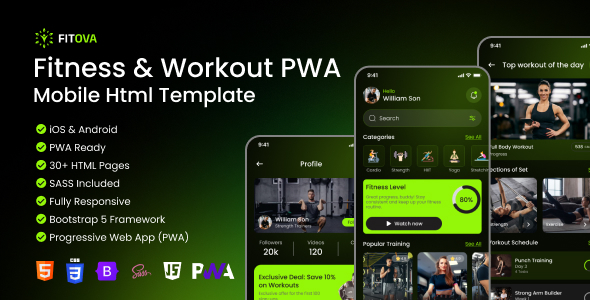
Fitova – Premium Fitness & Workout Tracker — PWA Mobile HTML Template
Version 1.0.0 | Tailwind CSS | Vanilla JS | PWA Ready | 35+ Pages | Chart.js
Table of Contents
- Introduction
- Key Features
- Quick Start
- Folder Structure
- Included Pages
- User Flows
- Fonts & Typography
- Customization
- JavaScript Architecture
- PWA Configuration
- Credits & Libraries
- Support
1. Introduction
Thank you for purchasing Fitova — a modern, mobile-first PWA template designed for fitness apps, workout trackers, and health platforms. It bridges the gap between web and native apps, delivering a true app-like experience directly in the browser — no App Store required.
Built entirely with Tailwind CSS and Vanilla JavaScript (no frameworks, no dependencies beyond Chart.js), Fitova is a complete, production-ready foundation with a stunning dark-green design, smooth micro-interactions, and a fully dynamic data layer powered by localStorage.
2. Key Features
| Feature | Details |
|---|---|
| PWA Ready | Service Worker + Web App Manifest — fully installable, offline-capable. |
| Tailwind CSS | Utility-first CSS via compiled output.css. Tailwind config included for rebuilding. |
| W3C Semantic HTML | Clean HTML5 with proper ARIA roles, labels, and landmarks throughout. |
| Mobile-First (430px) | Designed and optimized exclusively for handheld devices. |
| Fully Dynamic Data | Goals, metrics, bookmarks, food logs — all via localStorage, ready to connect to any real API. |
| Food Scanner | Native camera access, gallery upload, animated green scan overlay, live nutrition results. |
| Chart.js Integration | Interactive line chart for calories, steps, distance, heart rate, and weight tracking. |
| Bottom Navigation | Active icon swapping, context-aware active state detection by URL filename. |
| Toast Notifications | Global showToast(msg, type) used everywhere — no browser alerts. |
| Safe Area Support | iPhone notch & home indicator handled via CSS env() variables. |
| Retina Ready | SVG icons and WebP images for crisp display on all screen densities. |
| Cross-Browser | Tested on Chrome, Safari (iOS), Firefox, and Edge. |
3. Quick Start
- No build step required to view the template. Simply open the files in a local server:
- Option A — Live Server (Recommended): Install the Live Server extension in VS Code. Right-click app.html → Open with Live Server. The splash screen will auto-redirect to onboarding.html after 2.5 seconds.
- Option B — Rebuild Tailwind CSS: Only needed if you modify tailwind.config.js or add new Tailwind classes:
npm install
npm run build# Compiles src/css/input.css → src/css/output.css
Note: The compiled output.css is already included. You do not need to run npm to view or use the template. - Entry Point: app.html → onboarding.html → login.html → home.html. Open app.html in the project root as your starting point. It is the splash screen and the app’s entry point.
4. Folder Structure
Fitova/ (Root)
│ ├── app.html           # Splash screen — entry point
│ ├── manifest.json      # PWA manifest (name, icons, theme_color)
│ ├── service-worker.js  # Offline caching logic
│ ├── tailwind.config.js # Brand colors, fonts, custom screens
│ ├── package.json       # NPM definitions (Tailwind rebuild only)
│ ├── documentation.html # Documentation file
│ └── src/
│     ├── css/
│     │   ├── output.css         # Compiled Tailwind (Do NOT edit)
│     │   └── custom-styles.css  # Background images, animations, safe-area utils
│     ├── js/
│     │   ├── toast.js           # Global toast component
│     │   ├── navbar.js          # Bottom navigation active state
│     │   └── pages/
│     │       ├── splash.js
│     │       ├── onboarding.js
│     │       ├── home.js
│     │       ├── search.js
│     │       ├── search-found.js
│     │       ├── scan.js
│     │       ├── scan-result.js
│     │       ├── daily-goals.js
│     │       ├── edit-profile.js
│     │       ├── trainers-profile.js
│     │       └── ...
│     ├── pages/
│     │   ├── onboarding.html
│     │   ├── home.html
│     │   ├── login.html
│     │   ├── signup.html
│     │   ├── profile.html
│     │   └── ...
│     └── assets/
│         ├── icons/
│         │   ├── bottomNavbar/
│         │   ├── goals/
│         │   └── social/
│         ├── images/
│         │   └── trainers/
│         └── videos/
5. Included Pages
- app.html: Splash screen — animated logo display. Auto-redirects to onboarding after 2.5s. Entry point of the app.
- onboarding.html: 3-step welcome carousel with swipe gestures and skip option.
- login-options.html: Social login (Google, Facebook) or continue with Email selection screen.
- login.html: Email + password login with validation and password toggle.
- signup.html: New account registration with real-time field validation.
- forgot-password.html: Enter email to request a password reset link.
- check-email.html: Confirmation screen telling the user to check their inbox.
- create-new-password.html: Form to set a new password with strength indicator.
- reset-password.html: Success confirmation after password has been reset.
- home.html: Dashboard: daily summary, goal cards, featured workouts, health metrics, bottom nav.
- search.html: Search input with recent history, last seen workouts, and category filters.
- search-found.html: Search results with skeleton loading, filter pills, and promo banner.
- todays-best-fit.html: Curated daily workout picks with horizontal scroll cards.
- statistic.html: Weekly calendar, goal progress cards, Chart.js line graph, heart rate & blood pressure.
- my-favorite.html: Bookmarked workouts grouped by date. Bookmark toggle with toast notifications.
- details.html: Generic workout detail linked from search results.
- trainers-profile.html: Trainer bio, follower stats, exclusive deal banner, popular courses scroll.
- workout-sets.html: Full workout info: trainer card, session sets, share modal, ratings link.
- reviews.html: Star ratings and user reviews for a workout.
- play.html: Video player with full controls, set counter, horizontal session scroll, exercise bookmarks.
- shedule.html: Weekly workout schedule planner with day-by-day view.
- scan.html: Camera access / gallery upload with animated green scan line overlay and food validation.
- scan-result.html: Dynamic nutrition display: food name, calories, protein, carbs, fat — save to food log.
- profile.html: User profile overview with stats, goal badge, and quick links.
- settings.html: App settings hub: dark mode toggle, subscription modal, logout confirmation.
- edit-profile.html: Edit name, email, gender, date of birth (3 selects), and weight (kg/lbs toggle).
- language.html: App language selection screen.
- security.html: Password change and two-factor authentication settings.
- help-and-support.html: Help center / FAQ / support contact hub.
- subscription.html: Plan comparison and subscription upgrade screen.
- payment-method.html: Saved cards and add new payment method.
- add-card.html: Credit/debit card entry with real-time card formatting.
- confirmation.html: Payment success confirmation screen.
- gender.html: Gender selection step.
- birthday.html: Date of birth input step.
- weight.html: Weight input with kg/lbs toggle step.
- sports.html: Sport preference selection step.
6. User Flows
- First Launch Flow: app.html → onboarding.html → login-options.html → signup.html → gender.html → birthday.html → weight.html → home.html
- Returning User Flow: app.html → login-options.html → login.html → home.html
- Password Reset Flow: login.html → forgot-password.html → check-email.html → create-new-password.html → reset-password.html → login.html
- Workout Flow: home.html → search.html → search-found.html → details.html → workout-sets.html → play.html
- Food Scanner Flow: scan.html → Upload / Camera → Scan Animation → Tap to view → scan-result.html
- Profile & Settings Flow: profile.html → settings.html → edit-profile.html / security.html / language.html / help-and-support.html
7. Fonts & Typography
- Poppins — Primary Font: Used for all body text, headings, labels, buttons, and UI elements across every page.
- Anek Bangla — Brand Only: Used exclusively for the Fitova brand logotype on app.html (splash screen) only.
- Font Loading: Both fonts are loaded from Google Fonts in the <head> of the relevant pages.
- Tailwind Font Config: fontFamily: { sans: [“Poppins”, “system-ui”, “sans-serif”] }
- Font Sizes Used: text-xs (12px), text-sm (14px), text-base (16px), text-lg (18px), text-xl (20px), text-2xl (24px), text-[44px] (44px for Fitova logotype)
8. Customization
- Brand Color: The primary brand color is #94F608. Change it in tailwind.config.js and src/css/custom-styles.css.
- Background Images: All hero images are CSS utility classes in custom-styles.css. To swap an image, find its class and update the URL.
- Changing Fonts: Replace the Google Fonts <link> in all HTML <head> tags with your chosen font. Update tailwind.config.js fontFamily.sans to the new font name. Rebuild CSS: npm run build.
- Bottom Navigation Links: Edit src/js/navbar.js to update routes and active-state detection.
9. JavaScript Architecture
- All JavaScript follows a strict IIFE pattern — each page has one self-contained file with no global variable leaks between pages.
- Script Load Order: Always load scripts in this order before </body>: toast.js, navbar.js, then page-specific JS.
- Toast Notifications: Use showToast(“Workout saved! ”, “success”); showToast(“Please fill all fields”, “error”); showToast(“Coming soon!”, “info”);
- localStorage Data Keys: userGoal, userProfile, favoriteWorkouts, recentSearches, weeklyActivity, healthMetrics, trainerProfile, scannedImage.
10. PWA Configuration
- Fitova is fully PWA-ready. Users can install it on their home screen like a native app.
- manifest.json: Contains app name, icons, theme color, and start URL.
- Service Worker: Add new pages/assets to the cache list in service-worker.js.
- Important: PWA features require HTTPS in production. Use localhost for local development.
11. Credits & Libraries
- Tailwind CSS v3 — All styling (utility-first CSS)
- Chart.js v4 — Weekly progress line chart on statistic.html
- Google Fonts — Poppins (primary typeface), Anek Bangla (logotype)
- Custom SVG Icons — All UI icons (included in assets/icons/)
- WebP Images — All app images (optimized for web)
12. Support
If you have questions beyond the scope of this documentation, please contact me via the ThemeForest item page. I typically respond within 24–48 hours.
Before reaching out, please:
- Read this documentation fully.
- Check that you are opening files through a local server (not by double-clicking the HTML file directly in Finder/Explorer).
- Check the browser console (F12) for any error messages.
- Tip: Use the VS Code Live Server extension for the smoothest development experience. It handles all path resolution automatically.
Fitova v1.0.0 — © 2026. All rights reserved.